


How to use AI more effectively at work—5 easy tips to try right now


Table of Contents
- 5 tips how to use AI more effectively
- 1. Ask AI to improve your prompt
- 2. Tell AI to ask you questions before it answers
- 3. Use your tool’s project or memory feature
- 4. Try different AI tools for different tasks
- 5. Talk to your colleagues about how they use AI
- Want to know where your time goes? DeskTime has the answer
- 5 tips how to use AI more effectively
- 1. Ask AI to improve your prompt
- 2. Tell AI to ask you questions before it answers
- 3. Use your tool’s project or memory feature
- 4. Try different AI tools for different tasks
- 5. Talk to your colleagues about how they use AI
- Want to know where your time goes? DeskTime has the answer
Are you wondering how to use AI more effectively? You’re not alone.
AI usage has grown explosively, but that doesn’t mean people are getting the most out of these tools. Most of us have learned the basics: write a clear prompt, give it context, and you’ll get a decent result. That’s a solid foundation.
But with just a little more effort—often a single extra line in your prompt—you can push the quality of your outputs from great to impressive.
To help you do just that, we’ve compiled five tips. These will work ChatGPT, Gemini, Claude, or whatever your LLM of choice is.
Want to get the most out of your time?
Try DeskTime for free!
Try free for 14 days · No credit card required.
By signing up, you agree to our terms and privacy policy.
5 tips how to use AI more effectively
Before we start, note that we’re not covering AI agents, workflow automation, the differences between paid plans, or any other technical stuff. This article won’t help developers automate an entire company.
We’re keeping it simple—these tips are designed for people who open an AI chat window and start typing. Though, admittedly, some technical people will benefit from them as well.
1. Ask AI to improve your prompt
AI knows what AI needs. So before diving into your actual task, give AI your draft prompt and ask the model to improve it.
Does that involve writing an expansive separate prompt, defining various variables, contexts, and needs? No—it’s far easier than that.
Write your prompt as you always do, and then instead of submitting it, simply add “Improve this prompt:” at the very start.
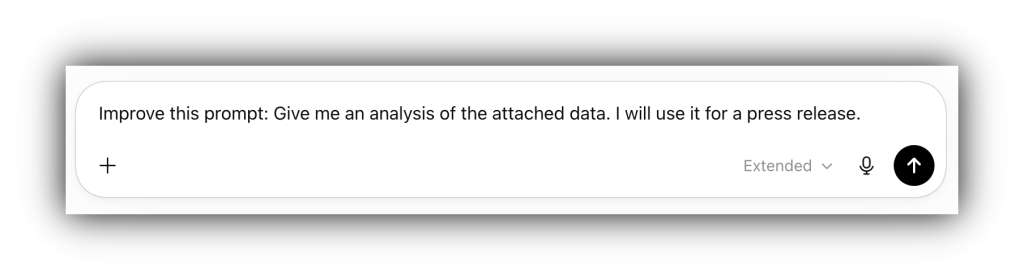
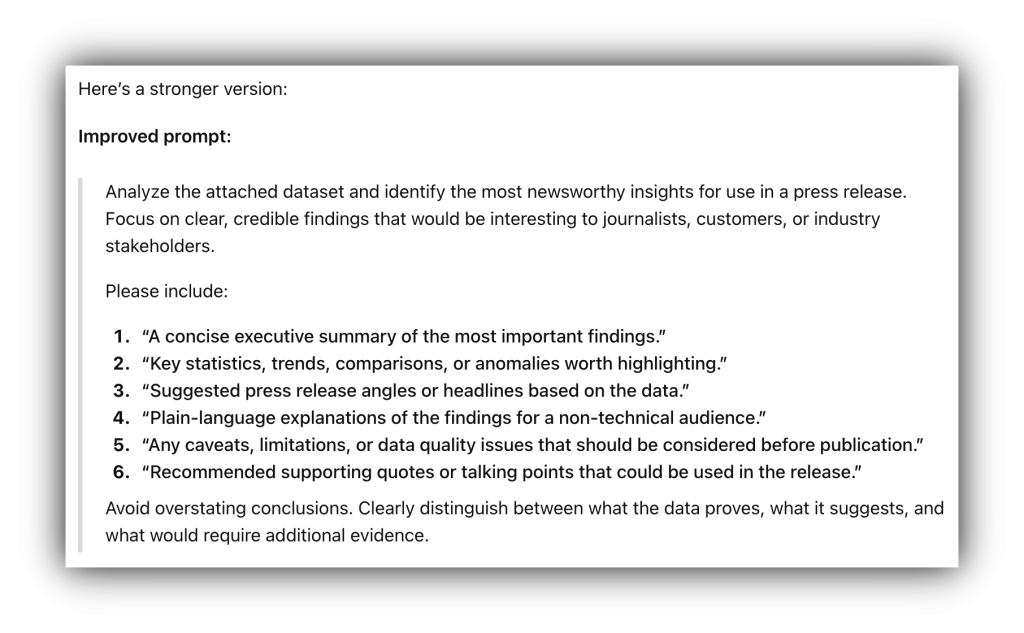
Whether you’re a thorough prompter or someone who types a quick question and hopes for the best, this trick levels the playing field. The AI will often add structure, clarify ambiguity, and request specifics you hadn’t thought to include. Review and run the improved version, and you’ll almost always get a better result than if you’d gone with your original.
2. Tell AI to ask you questions before it answers
Ever finished reading a bad AI response and thought, “I should’ve mentioned X in my prompt”?
Me too.
And there’s an easy fix.
Once again we’re adding a simple instruction to your prompt, this time at the end: “Before answering, ask me clarifying questions.”
The model will pause and check in, prompting you for details you might not have realized were relevant. This is especially useful for complex or open-ended tasks where the scope could go in several directions. One small line saves you a round of back-and-forth after the fact.
An important note: phrase it as a direct instruction, not a conditional. “Ask me questions before answering” works much better than “If you have questions, feel free to ask.” The latter gives the AI an easy out to skip ahead—something it’s keen to do, since that lets it save on compute.

Want your business to thrive?
Boost your team’s productivity and efficiency ratings with time tracking!
3. Use your tool’s project or memory feature
If you find yourself typing the same prompt over and over and adding the same documents for context (like I used to), then you’re losing time you don’t need to lose. The top AI tools all have a way to store persistent context:
- Custom GPTs (OpenAI)
- Gems (Google Gemini)
- Claude Projects (Anthropic)
These features let you set a standing brief—upload relevant documents, define your style, explain your context once—and then every new conversation picks up from there. It’s a small investment upfront that pays back every time you open the tool. If you work on recurring tasks like writing reports, summarizing meetings, or drafting client emails, this one will change how you work, namely, make your life easier.
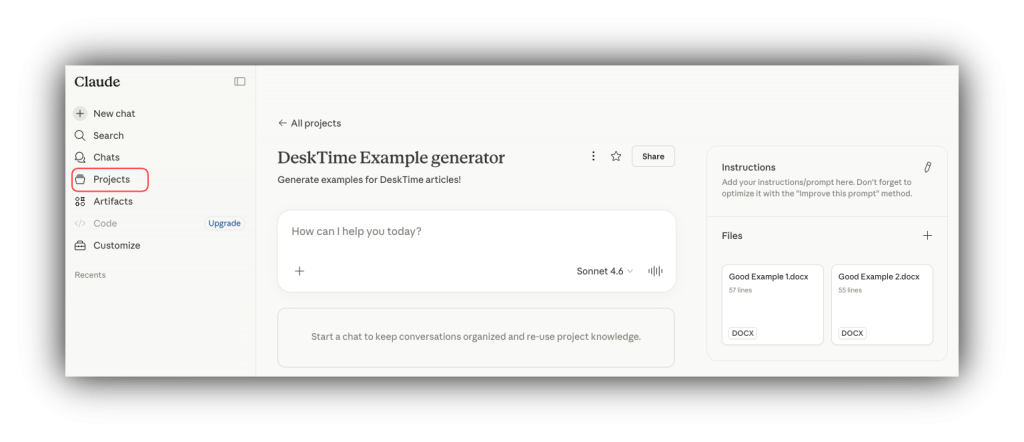
For example, I created a Claude Project for transcript polishing and here’s how it changed my workflow.
Before: I used to add the raw transcript, write a detailed prompt, add context, add example documents—and then get different results every time because my wording had changed or because the AI picked up on different things.
After: I uploaded all the context and files into the Claude Project once. Now, I just attach the new raw transcript and prompt Claude to “Polish this”, and it produces a result of consistent quality and style every time. Better yet, it takes me 30 seconds instead of 30 minutes to get there.
4. Try different AI tools for different tasks
The three most popular AI tools—ChatGPT, Gemini, and Claude—each have their own strengths, and learning how to use AI to work more efficiently often means knowing which tool to reach for. They’re trained differently, respond differently, and excel at different things.
For example, you might find that one is better for learning about unfamiliar topics, another feels more natural for writing and editing, and a third is more useful for research (especially when you cross-check results). Try the same prompt in two tools and compare the outputs—you’ll quickly develop a feel for where each one shines, or whose responses speak most to you.
There’s also a practical reason not to be loyal to one tool: AI models are updated constantly, and the “personality” or behavior you’ve gotten used to can change overnight. Staying flexible means you’re never caught off guard when your go-to tool gets an update and suddenly starts working differently.

5. Talk to your colleagues about how they use AI
AI prompting is unusually personal. Two people doing the exact same job will often approach the same task in completely different ways—different prompts, different tools, different workflows. That’s actually a good thing, because it means the person sitting next to you might have figured out something you haven’t.
Make AI a topic at your next team meeting, organize AI sharing discussions, or just bring it up casually. You’ll be surprised by what people have figured out on their own. Learning how to use AI more efficiently doesn’t always require a course or a tutorial—sometimes it just takes a conversation.
Want to know where your time goes? DeskTime has the answer
There you go! With these 5 tips you now know how to use AI more effectively, namely, spend less time fighting and prompting AI, and more time on value added activities.
Nowadays, with AI dramatically accelerating work, reclaiming time is invaluable. But it’s hard to know exactly how much time you’re saving (or losing) without visibility into your workday. DeskTime helps you track how your time is spent, so you can see the real impact of the tools and habits you build.
Our experts would love to hop on an intro call with you and to talk about how DeskTime can help your company move the productivity needle. You can book one here. Or just hop onto our demo to see how it works!

Did you find this article useful? Give it a clap!
Psst! You can clap more than once if you really loved it 🙂