SourceForge icon G2 logo Capterra logo
G2 Star rating 4.5/5 avg. (2000+ reviews)

Reliable remote employee monitoring

See your remote team's hours, apps, and project time, automatically. The same visibility you'd have in-office, without the constant check-ins.
Used by 730k+ users
14 day free trial
No credit card required
"See what drives your team's focus and what disrupts it." - Artis Rozentāls, CEO of DeskTime
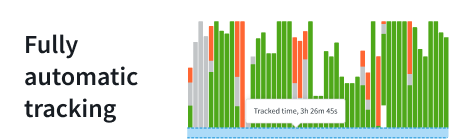
Fully automatic tracking with DeskTime: all work activity can be tracked and visualized
Integrations & API: DeskTime can be connected to seamlessly work with other services

Remote teams are hard to manage when the work stays invisible

DeskTime gives you data to manage with clarity, not guesswork.
Time is money—we’re here to help you save both
  • You don't know what your team actually worked on today
  • Projects run over budget because no one tracked time per task
  • Some people are maxed out, others are coasting. You can only guess which
  • Everything feels fine until a project slips or a client disputes the hours. Then there's no data to explain why.
  • DeskTime gives you the full picture of every workday.

    Hours, projects, attendance, capacity.

With us, time tracking will be a breeze—both for you and your team
Get instant and accurate data

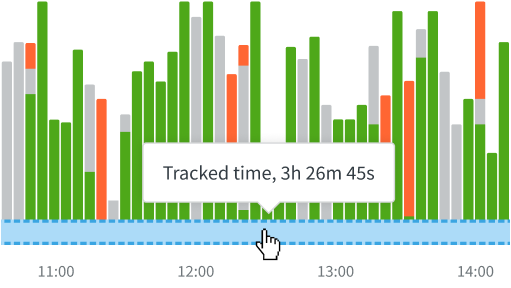
Fully automatic start and end times, no manual entry, and no human error—remote employee monitoring starts up as soon as you open the computer and stops when you close it.
Optimize your resources

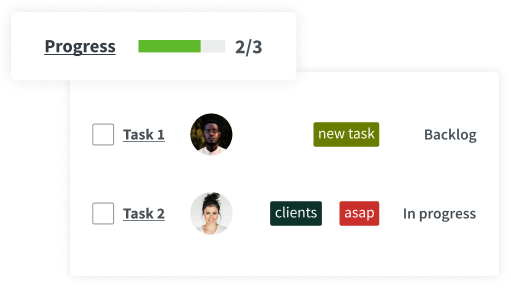
Estimate project costs, assign hourly rates, and control expenses. Project management is easy when you have a birdseye view of all ongoing processes.
Manage your workforce smoothly

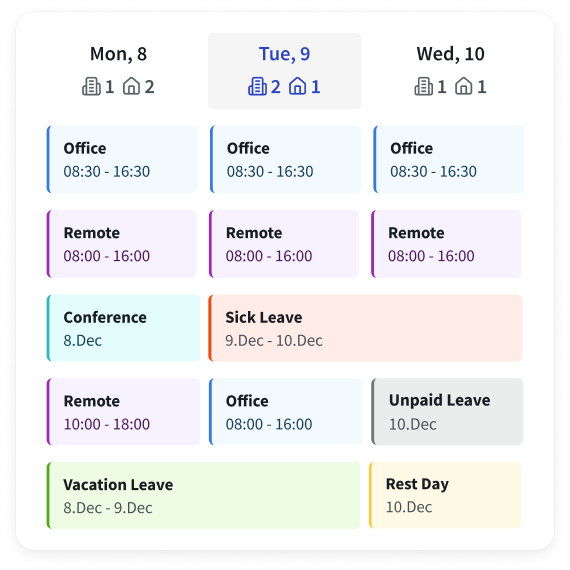
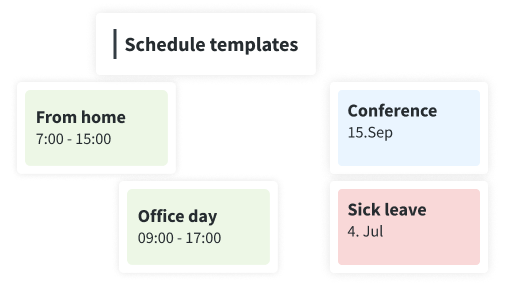
DeskTime isn't just a remote employee monitoring tool. You can assign shifts and oversee absences, stay informed about remote workers and run a hybrid office all on one platform.

See our impact on companies like yours

HasTech
$24K
saved yearly on a $300/month spend
“It saves us around $2,000 monthly. It saves money, and at the same time, it increases revenue. So it's beneficial in two crucial ways.”
Aslam Hasib
Managing Director, HasTech
GrabOn
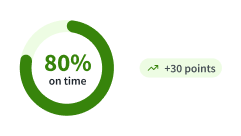
50% → 80%
of task deadlines met
“If previously only 50-60% of task deadlines were met, with DeskTime this number rose to 80%. It served as an indirect productivity bump that ensured more work was being done.”
Raghu Prodduturi
Director of Product Marketing, GrabOn
Nexus Auto Transport
7 years
running DeskTime across 5 countries
“There’s no gray area with DeskTime. We can keep track of hours with utmost accuracy and track employee productivity to promote growth. DeskTime is a luxury I never want to go without.”
George Arkin
Owner, Nexus Auto Transport
HasTech
$24K
saved yearly on a $300/month spend
“It saves us around $2,000 monthly. It saves money, and at the same time, it increases revenue. So it's beneficial in two crucial ways.”
Aslam Hasib
Managing Director, HasTech
GrabOn
50% → 80%
of task deadlines met
“If previously only 50-60% of task deadlines were met, with DeskTime this number rose to 80%. It served as an indirect productivity bump that ensured more work was being done.”
Raghu Prodduturi
Director of Product Marketing, GrabOn
Nexus Auto Transport
7 years
running DeskTime across 5 countries
“There’s no gray area with DeskTime. We can keep track of hours with utmost accuracy and track employee productivity to promote growth. DeskTime is a luxury I never want to go without.”
George Arkin
Owner, Nexus Auto Transport

See your remote team as if they were in-office

Set up DeskTime in minutes and see where the hours really go.

Try free for 14 days. No credit card required. By signing up, you agree to our terms and privacy policy.

Grid Leader Summer 2025

Employee Monitoring

High Performer Summer 2025

Enterprise Time Tracking

Summer 2025

Users Love Us

High Performer Summer 2025

Employee Scheduling EMEA

High Performer Summer 2025

Time & Attendance India

4.5 out of 5
from 400 reviews

It’s the ultimate automatic productivity tracker

Get the clarity you need to manage your hybrid team. Our tracker works automatically in the background, giving you valuable insights so you can focus on leading, not logging.

Tracking starts and stops automatically with your device

DeskTime starts with your device and stops when you shut down. No manual input needed, so it stays where it should be—in the background.

See Every Activity: Apps, Websites, And Documents

Monitor app, website, and document usage to get real-time insights into your team's workflow and ensure employee privacy is respected with Private time mode.

Quick and easy setup

You can start tracking productivity right out of the box with no complex setup required. Simply install, add your team, and get going instantly.

730K+

Users trust us

330M+

Hours tracked

30%

Productivity boost

How DeskTime works

With DeskTime, you can see your employees' arrival and departure times, analyze their productivity, schedule shifts, oversee absences, maintain a healthy work-life balance, keep track of specific projects, and more.

Step 1 to start using DeskTime: Sign up and download the desktop app
Sign Up
Create an account and download the DeskTime app.
Step 2 to start using DeskTime: Add your employee details and create teams
Add your team details
Add your employees individually or in batches and sort them into teams.
Step 3 to start using DeskTime: Start tracking time and see productivity insights
Start tracking!
Read this article on how to use our time tracking tool and communicate it to your employees.
Integrations with popular work tools

Integrations with popular work tools

From calendar apps to help you track offline time, to project management software to make project and task tracking accurate, while effortless. DeskTime can simplify every aspect of your workflow.

Highly rated and globally trusted

G2 badge for Leader in Employee Monitoring software category, Summer 2026
Sourceforge badge for Leader of Automatic Time Tracking software in Spring 2026
Top Business Software badge for Top Rated software in the Time Tracking category, Spring 2026
Slashdot Leader badge of Spring 2026
G2 milestone badge for most loved software in the Automatic Time Tracking category, Summer 2026
SourceForge icon G2 logo Capterra logo
G2 Star rating 4.5/5 avg. (2000+ reviews)

Don’t take our word for it

Want to hear from our users? Discover their reviews on G2.

Book a 1:1 introduction call

Planning to onboard a large team of 20+ users?

Schedule a chat with our product expert to learn how DeskTime can be tailored to fit your needs and requirements.

1
Fill out the form
Start the booking process with basic info about your company.
2
Schedule your call
Choose a date and time that works for you.
3
Answer a few additional questions
We want the call to be about you—so the more we know, the better!
4
All set!
You can relax and wait for the call.

It looks like you're using a personal email. Please provide a company email address.

Things worth knowing about using a time tracker

This self-analysis will motivate both you and your employees to do better and avoid any unnecessary and unproductive actions like those well-known “fast and easy” 5-minute jobs many of us are often asked to do. Employees who track time can note how much these extra jobs actually take up their day and be able to make better decisions on whether it’s worth interrupting their workflow.
The first and foremost features you should pay attention to are the time tracking abilities themselves. Some apps like DeskTime let you track time automatically without any manual input necessary (but note that manual time tracking for time spent away from the computer is also available). Other apps track time using start/stop timers, which means you must remember to mark the beginning and end of your activities; otherwise, the data will be skewed, defeating the purpose of time tracking. Most apps also offer team management, project tracking, and other features, so it's all about your team's specific needs.
DeskTime is a time tracking app whose purpose is to provide its users with insights into their work patterns – how much time they spend working, how productive they are, how many hours go into specific projects, and more. For managers, DeskTime is a handy tool to help oversee and organize their teams, spotting the best performers and slackers, etc. DeskTime can be particularly helpful if you're managing a remote team – you can rest assured that even though your teammates are not in front of you, they're still getting the job done.
The Dashboard is an overview section for how the entire company is doing for the selected day. This section is only available to the Company owner and admins. Below the employee statistics, you can also see how much time the company has spent on specific applications, divided into categories of Productive, Neutral, and Unproductive. Any suspicious or unproductive screenshots will be shown at the very bottom of the Dashboard if screenshots have been enabled. Under the title Dashboard, you can select a specific team to view the stats, excluding all other employees from the statistics.
DeskTime integrations allow you to bring your time and project management applications together to track time efficiently. There are two types of integrations available - Calendar integrations and Project app integrations. Calendar integrations automatically apply events to your offline times, as scheduled in the calendar. Project app integrations allow you to use DeskTime to track time for projects created in those applications. Using the project tracker, your employees can log time to those projects in DeskTime.

Reach your goals with DeskTime

Join the 50K+ businesses and more than 730K+ users who trust DeskTime to improve their daily productivity.

Book an Intro
Try free for 14 days. No credit card required. By signing up, you agree to our terms and privacy policy.