Integrating Zapier with DeskTime time tracking software

Connect your favorite tools to DeskTime to automatically sync projects and tasks. No manual work required.

SourceForge icon G2 logo Capterra logo
G2 Star rating 4.5/5 avg. (2000+ reviews)

TL;DR: DeskTime supports integration with Zapier. This way, you can connect DeskTime with thousands of business apps (including Slack, Salesforce, Freshdesk, Monday.com, and many more). DeskTime can then automatically create new projects or tasks based on triggers in your connected apps.

Sync your projects with DeskTime automatically

With DeskTime + Zapier, you can keep project tracking accurate and up to date—without lifting a finger.

Connect your existing tools

Zapier links DeskTime to thousands of apps. Set up a trigger in your other apps, and DeskTime will automatically create a new task or project.

Keep project tracking accurate

Your team can instantly start tracking time for each task or project that you synced with Zapier. Get accurate data for time spent on each customer, issue, or task!

No double entry required

Keep your workflow tidy and efficient—no need to manually enter tasks in DeskTime. The Zapier integration will sync automatically and keep this data up to date.

How DeskTime + Zapier integration works

Connect DeskTime with Zapier in minutes and enhance your existing workflow with automatic time tracking.

Create a Zap
In Zapier, choose your trigger app and event—a new lead in your CRM, a new support ticket, a new GitHub issue, whatever fits your workflow.
Choose a DeskTime action
Select "Create Project" or "Create Task" as your Zapier action, and DeskTime will create new projects and tasks whenever the trigger event happens.
Start automating
Turn your Zap on. From now on, DeskTime automatically creates projects or tasks, and your team can jump straight into tracking time.

A time tracker that won’t interrupt your team’s workflow. Ever.

Forget manual entries and distractions. With DeskTime, time tracking runs on autopilot—zero effort needed.

Integrate DeskTime with over 9,000 tools

Don't see your favorite business tool among our native integrations? Use almost any business app that supports Zapier as a trigger to automatically create new tasks or projects in DeskTime. Here are some examples.

Sales & client intake

Salesforce + DeskTime

Trigger: New lead acquired
Action: Create a new project

Result: Sales agents can now automatically track time spent on each lead— meetings, emails, creating custom sales decks, etc.

Stripe + DeskTime

Trigger: Payment received
Action: Create a new project

Result: When a client pays, the project starts immediately. Automatically start tracking time and resource investment in each project.

Jotform or Typeform + DeskTime

Trigger: New form submission
Action: Create a new project

Result: When a client fills out a project intake form, DeskTime creates the project instantly, so time tracking starts from day one—ideal for agencies and freelancers.

Support & communication

Slack + DeskTime

Trigger: New message in a specific Slack channel
Action: Create a new project

Result: Turn a #new-requests or #client-feedback channel into an automatic task queue, no need to copy-paste between tools.

Freshdesk + DeskTime

Trigger: New ticket
Action: Create a new project

Result: Each new ticket will be added as a new task in DeskTime, and the support agent can easily track how much time they spend on resolving them.

Gmail + DeskTime

Trigger: New labeled email
Action: Create a new project

Result: Turn client emails into tasks automatically. This is especially useful for small teams or agencies that organize their work in email inboxes rather than enterprise CRM tools.

Dev, data & meetings

GitHub + DeskTime

Trigger: New issue
Action: Create a new project

Result: Automatically create tasks for each issue so that the assignee can accurately track time spent resolving it.

Excel or Google Sheets + DeskTime

Trigger: New spreadsheet row
Action: Create a new task

Result: Turn any spreadsheet into a project intake system. Add a row when a new client request comes in, and DeskTime automatically creates the task.

Zoom + DeskTime

Trigger: New meeting created
Action: Create a new project

Result: Each new Zoom meeting creates a project that can track not only the meeting duration but also the time invested in its preparation and follow-up.

These were just a few examples of what's possible with DeskTime + Zapier.

Explore DeskTime's integrations on Zapier to see what triggers you can use to build your perfect workflow!

Why choose DeskTime?

The most automatic and customizable time tracker on the market, built to power modern, hybrid teams with speed and simplicity.

Automatic by design

DeskTime runs the moment your computer starts and stops when you shut it down. No manual actions required; tracking stays invisible, accurate, and effortless.

Customizable to your needs

From app and URL tracking to shift scheduling and productivity rules, DeskTime adapts to the way your team works, not the other way around.

Set up in minutes

Get started faster than with any other tracker. Install, invite your team, and watch productivity insights roll in. No complicated onboarding, just instant results.

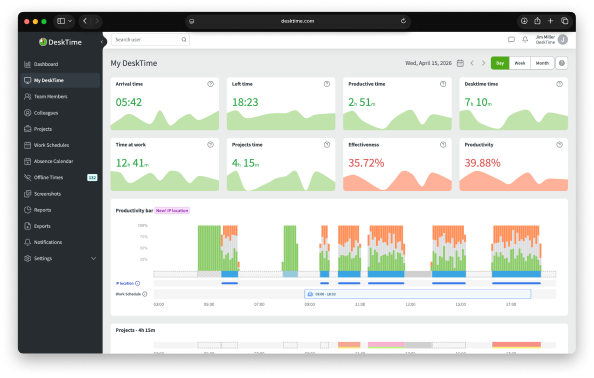
Illustration of the dashboard in the DeskTime work monitoring software

Explore our Demo account

Want to see the ins and outs of DeskTime before signing up?

Try out our free Demo account!

Discover DeskTime

Frequently asked questions about DeskTime and Zapier integration

The DeskTime and Zapier integration lets you connect DeskTime to thousands of other business tools without any coding. When something happens in another app (e.g., a new deal, a support ticket, or a Slack message in a specific channel), Zapier can tell DeskTime to create a project or task so your team can start automatic time tracking right away.
Zapier support is included in DeskTime Premium and Enterprise plans. Visit our Pricing page to see a detailed comparison of plans, or sign up for a free 14-day trial that includes all Premium features.
When you integrate DeskTime with Zapier, you can use “Create new project” or “Create new task” actions. They will automatically create new tasks or projects in DeskTime whenever your connected apps trigger a Zap in Zapier.
Zapier connects DeskTime to over 9,000 apps, including Salesforce, HubSpot, Slack, GitHub, Google Sheets, Typeform, Stripe, DocuSign, and many more. If your tool is on Zapier, you can use it as a trigger for DeskTime.
No. Zapier is a no-code automation platform. Setting up a Zap takes just a few minutes: choose your trigger app and event, select DeskTime as the action app, map your fields, and turn it on.